AI Content Isn’t Penalized by Google — Quality Is. Google does not automatically penalize AI-generated content just for being produced by AI. What matters most is whether the content is helpful, original, and people-first — not the authorship method.
Google’s Helpful Content system and spam policies aim to reduce low-value, unoriginal, or manipulative content, regardless of how it was made.
Before humanizing content, make sure your AI draft is:
- Useful and solves real user intent
- Original and not duplicated from other sites
- Structured logically with proper headings
These are all signals aligned with what Google recommends for people-first content.
Set Clear Goals for Humanization
Decide what your content must achieve:
- Clarity and readability
- Natural tone that suits your audience
- Compliance with SEO guidelines
These goals help steer the editing process and ensure your final piece adds real value.
How to Make AI Content With GPT?
First step is to create Content with any AI tool like GPT. Here are the things to keep in mind :
i. Writing the Right Prompt for Natural Output
Your prompt guides the AI’s output quality. To generate more human-like text:
- Ask for personalization (e.g., “Write in a conversational tone”)
- Include audience details (e.g., “for beginner bloggers”)
- Provide context for depth
The clearer your brief, the better your draft’s structure and tone will reflect genuine human style before editing.
ii. Choosing the Correct Tone & Audience
AI models can generate text in different tones — formal, casual, humorous, etc. Choose a tone that matches your target audience and nurture it with examples or context.
iii. Mistakes to Avoid When Generating AI Content
- Generic prompts – too vague, leading to shallow responses.
- No audience focus – fails to speak directly to readers’ needs.
- Copy-paste from AI output without editing – may produce content that looks repetitive or unnatural.
Best practice: always have a human review, edit, and personalize the generated output to ensure depth and clarity.
How to Format Content Manually Before Humanizing?
After creating content the first step is format your content manually :
i. Breaking Long Paragraphs Into Human-Readable Sections
Long blocks of text feel dense and mechanical. Break paragraphs every 2–4 sentences, focusing each one on a single idea. This boosts readability — a core component of people-first content.
ii. Adding Headings, Lists, and Natural Transitions
Use meaningful headings and subheadings to shape the reader’s journey. Lists, bullets, and short transition sentences help maintain flow — like a human writer guiding the reader.
iii. Removing Repetitive or Over-Optimized Keywords
Keyword stuffing or robotic phrasing can signal low-effort content. Remove unnecessary repetition and focus on natural inclusion of core terms to improve both readability and SEO.
How to Use AI Humanizer (Humanify AI)?
Here are the paratical way to use Humanify AI :
i. Step-by-Step Guide to Humanize Content Using Humanify AI
- Upload your AI draft or paste text into Humanify AI
- Choose the humanization level — mild (light edits) to strong (deep rephrasing)
- Run the humanization process.
- Review the output for meaning, flow, and factual accuracy.
- Perform a human proof-read and finalize structural headings.
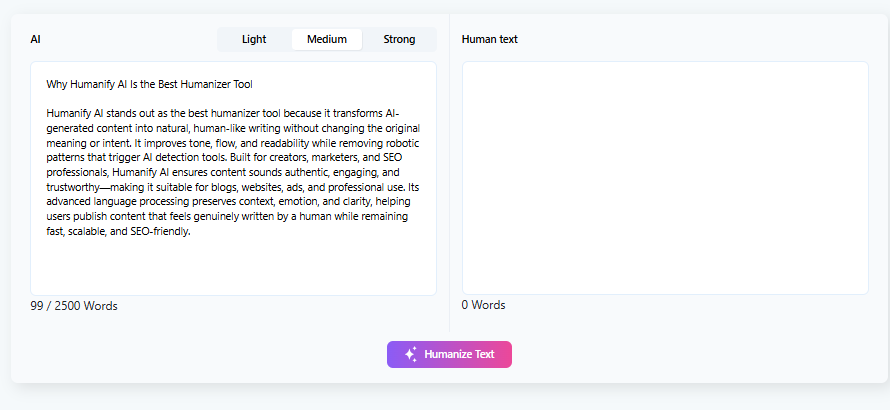
This workflow ensures the output feels natural, engaging, and unique, rather than formulaic.
ii. Selecting Humanization Level for Different Use Cases
Humanify AI may let you choose:
- Light humanization: where your draft is already good but needs readability tweaks.
- Moderate humanization: to add tone variation and transition improvement.
- Deep humanization: to summarize, reorganize, and paraphrase major sections.
Choose based on your initial draft quality and the publishing context.
iii. Checking Readability, Tone, and AI Detection Score
After processing:
- Run a readability test to ensure content flows like human writing.
- Adjust tone where necessary (professional, friendly, authoritative).
- Optional: check against AI detection tools — humanized text often scores closer to human benchmarks.
Note: AI detection tools are not Google ranking signals, but improving readability and variation generally aligns with people-first quality.
Free vs Paid Version of Humanify AI (Humanify.AI)
Here are the breakdown of Free & Paid version of Humanify AI:
What You Get in the Free Version?
Free plans usually include:

- Basic humanization level
- Limited monthly usage
- Standard tone settings
Good for individual users or small blogs just starting with humanization.
Features Available in the Paid Version
Paid plans often unlock:
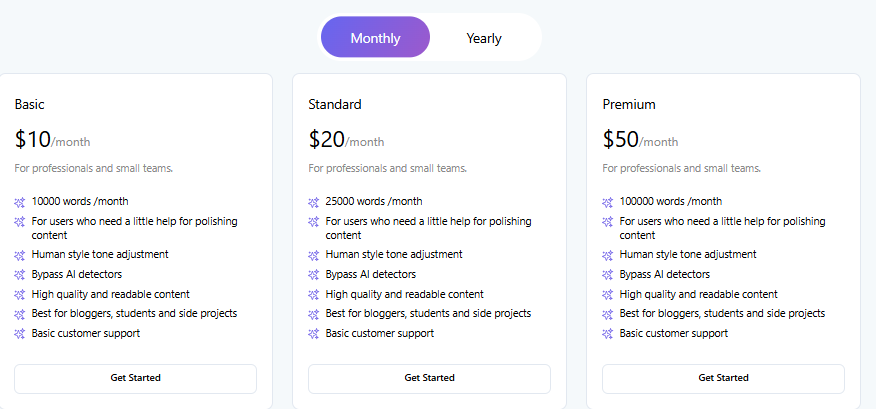
- Higher humanization levels
- Custom tone profiles
- Bulk processing
- API or enterprise integrations
These help agencies, SEO teams, and content publishers scale while maintaining quality.
Which Version Is Best for Bloggers, SEOs & Agencies
- Bloggers: Free or entry paid plan is often enough for occasional posts.
- SEOs: Paid version helps consistency and volume.
Agencies: Bulk workflows and customization are worth the investment.
Final Verdict – Is Humanify AI the Best AI Humanizer?
Any content creator depending on AI tools for drafts but needing:
- Natural tone
- Readable structure
- SEO-aligned content
Humanify AI suits bloggers, SEO professionals, and content teams.
When Humanify AI Works Best
- When your AI drafts are technically correct but lack personality
- When you want to reduce mechanical phrasing
- When preparing content for publishing at scale
Humanization helps align AI drafts with Google’s people-first content goals — improving quality, originality, and user experience. Merely generating text is not enough; editing and structuring it with human insight is the modern best practice for SEO.
FAQs About AI Humanizers & Humanify AI
1. Is Humanify AI Safe for Google SEO?
Yes. Google’s guidance confirms that as long as content is helpful, original, and created for people — not purely machine-generated to manipulate rankings — it is compliant with search policies.
2. Can Humanify AI Bypass AI Detection Tools?
Humanized content typically shows more variation and tone shifts, which can reduce AI detection flags, but it’s not a guaranteed ranking factor or a specific Google signal—rather, it helps improve quality and readability, which are ranking factors.
3. Does Humanify AI Change the Meaning of Content?
When used properly, humanization rephrases while preserving meaning. However, always review fact accuracy after processing.
Read More : How to Choose the Best AI Humanizer: Step by Step Guide